
Local Repair
Get your device fixed fast at an authorized repair centre near you.
Most repairs are completed the same day, so you can get back to using your device quickly.
How to make a claim
Need to make a claim? Whether your device is damaged or lost, we’re here to make the process simple.
On this page, you’ll find all the information you need to make your claim.

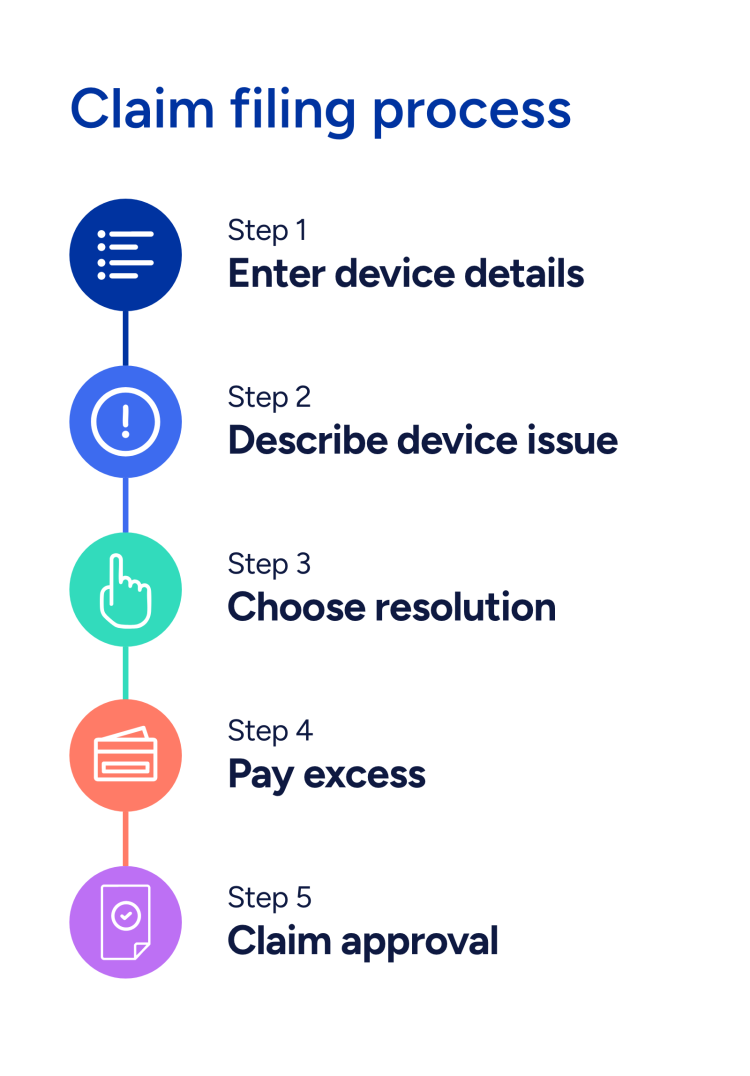
This information helps us identify your exact device and verify eligibility.
You’ll need to confirm:
The IMEI (a 15-digit number unique to each device)
The exact model (e.g. iPhone 13 Pro, Galaxy S22 Ultra)
The storage capacity (e.g. 128GB, 256GB)
You can usually find these in your device settings (under Settings > About), on the original packaging, or by dialing *#06# on most phones.
If your device has been stolen, you need to upload a police theft report or crime reference number.
Make sure the report includes:
Without this information, we may not be able to process your claim.
If your device was lost, you need to report it on www.reportmyloss.com, complete the online form & have it ready to upload once you start your claim.
Note: there is a charge of £5.95 for this service, but don't worry this amount will be automatically removed from your excess payment.
If your device isn't working but does not show any physical damage, please:
If the issue persists — or your device has visible physical damage (e.g. cracked screen, water damage) — you can continue with the claim.
For full instructions on preparing your device for repair, visit our Device Prep Guide.
Depending on what’s happened to your device and your policy terms, you might be offered a few different ways to fix it. Below, you can find information about some of the most common options.
Get your device fixed fast at an authorized repair centre near you.
Most repairs are completed the same day, so you can get back to using your device quickly.

Can’t make it to a local shop? We’ll send you easy packaging instructions so you can ship your device to us.
Repairs are typically completed within 5–7 business days after we receive your device.

If your device can’t be repaired, we’ll arrange for a replacement of the same or similar model.
Replacements ship quickly — usually within 48 hours of claim approval.

If your device has been stolen or lost and you're covered by your policy, we’ll arrange a replacement of the same device or a comparable model.
Once your claim is approved and any required documentation is received, we’ll ship your replacement quickly—usually within 48 hours—so you’re back up and running with minimal delay.

Issues can happen at any time. Sign up to a SquareTrade account for 24/7 access to your policy. Make a claim whenever you need it & track progress of the claim online.
Make things easier down the line — take a minute to sign up today.
You can make a claim online within a few minutes.
Most claims are approved immediately once they’re submitted.
For theft or loss claims, a police or loss report is required. These reports are typically reviewed within 48 hours.
Resolution times vary depending on your claim type:
In most cases, the solution depends on the type of damage. If your device can be repaired, we will proceed with the repair. If it cannot be repaired, an alternative solution will be provided depending on the coverage.
Yes. Once you make your claim, you can check every step of the journey (received, in repair, shipped) in your online account here.
We’ll also keep you updated by email.
Your claim may require an excess payment. An excess is a fixed contribution you pay towards a claim. It helps keep your overall cover affordable, and we’ll take care of the remaining costs.
Check your T&Cs for more information.
We recommend backing up and erasing your data, whenever possible, to protect your privacy before sending in your device.
If you can’t do this because the device won’t turn on, our technicians are required to keep all data confidential and will erase it during the repair or replacement process.
Looking for more tips or detailed guides?
Still have questions? Please visit our support centre — we’re happy to help!